Serving Django via CherryPy

Download django-cpserver Now at GitHub

Background

A few months ago, I got sick of trying to deploy Django sites on my cPanel server and got a VPS at Slicehost. Thanks to SuperJared, setting up Apache/mod_python behind an Nginx frontend was a snap.

I started deploying and migrating sites to the new server and kept an eye on my server resources via Munin. I had about 10 sites running on a 1GB Slice, but the Apache processes were hogging all the RAM. Restarting Apache would bring memory usage down to around 500MB, but within a couple of hours, it would be using all my available RAM, with individual proceesses using as much as 120MB.

I started asking questions and trying different options including mod_wsgi, verifying projects weren’t in debug mode, etc. Nothing made a difference.

CherryPy to the Rescue

I came across Loic d’Anterroches’ script to run Django via CherryPy and figured I’d give it a shot. Here are the results:
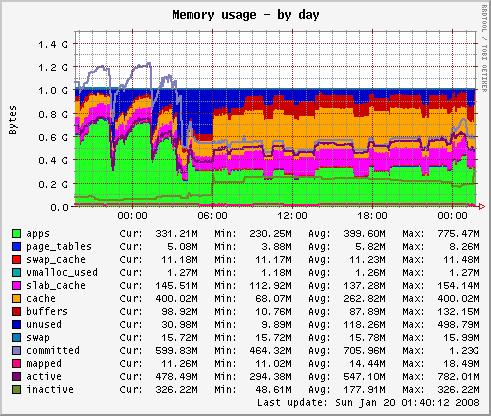
Memory Usage
those drops on the left side are Apache restarts
Memory usage went from 800-900MB to ~300MB. Whoa! Each server was using 20-50MB. I ran some ab tests against it and found it actually held up quite well against Apache/mod_wsgi for low to medium traffic. As expected Apache scaled better to higher traffic. For my needs, CherryPy was more than enough.

Implementation

I reworked the original script to be more Django-like and run as a custom Django management command. In its simplest form, the server can be started via:

$ ./manage.py runcpserver

Advanced usage details including running on a different port, specifying SSL certs and spawning as a background process run by a different user are available by calling ./manage.py runcpserver help.

Installation

  1. Download django_cpserver, unzip and add it to your PYTHONPATH.
  2. Add django_cpserver to your INSTALLED_APPS.

Additional Resources

Comments

  • April 1, 2008 at 4:28 p.m. #
    Nick mentioned:

    Have you tried mod_wsgi with apache worker mpm ?

  • April 1, 2008 at 4:46 p.m. #
    Peter Baumgartner piped up:

    @Nick No, I was using prefork.

  • April 1, 2008 at 6:25 p.m. #
    Chris piped up:

    Interested in your thoughts on this vs. the Apache/mod_wsgi approach given your comments about them being close to equal (unless I misunderstood you). I’ve decided on Nginx as my public-facing web server, deciding how best to deploy Django & PHP apps behind that now.

  • April 1, 2008 at 6:50 p.m. #
    Maciek commented:

    Thanks for sharing, I found your post just on time when I started suffering from Apache memory use!

    Do you have an idea if it’s possible to make use of http://www.cherrypy.org/wiki/AutoReload with CherryPyWSGIServer and Django WSGIHandler?

    I am looking for quick and effective replacement for Django’s built-in development server…

  • April 1, 2008 at 8:50 p.m. #
    Peter Baumgartner added:

    @Maciek, I came across this thread on the developer list a while back that looks like it provides a drop in replacement for the development server.

    @Chris, If I didn’t have the memory issues, I would choose Apache/mod_wsgi over this setup. It is more widely used and you’ll likely find more help with it in IRC or the mailing lists.

  • April 4, 2008 at 4:40 a.m. #
    Graham Dumpleton responded:

    Whether you use prefork or worker MPM with Apache, you could easily have reduced Apache memory usage by delegating the Django application to run in a single multithread mod_wsgi daemon mode process.

    Since Apache would already be integrated with system startup code, and Apache/mod_wsgi manages the daemon process, you don’t need to use monit so less work to setup.

    If you want some measure of load balancing between multiple processes, then you just configure mod_wsgi daemon mode so it uses multiple processes in the daemon process group for that application.

    Once you have pushed the application into mod_wsgi daemon mode process, if Apache itself is then only handling static file requests, much better to use worker MPM.

    Overall, given that one would generally proxy CherryPy WSGI server hosted application behind Apache anyway, so that static file serving is quick, the overall memory requirements should be about the same if same number of CherryPy WSGI server processes are used as mod_wsgi daemon processes. If you aren’t seeing that, you might want to go to the mod_wsgi discussion group on Google groups and discuss your configuration.

    Finally, in mod_wsgi 2.0 you have automatic daemon process restarting when WSGI script file is changed. This is without having to restart whole of Apache. Thus for development, just make all your changes, and then touch the WSGI script file and it will reload automatically upon next request.

  • April 4, 2008 at 8:16 a.m. #
    Peter Baumgartner added:

    Thanks for the tips Graham. I’m pretty sure I tried mod_wsgi in daemon mode and still had issues, but I’m willing to give it another stab and post my results.

    With the success of mod_wsgi, I don’t doubt I was doing something wrong. At the time, CherryPy was the path of least resistance.

  • September 9, 2008 at 5:44 p.m. #
    Frank chimed in with:

    Thanks for sharing, I am using this on my server.
    In fact it works very well on the development server, but once I went to deploy things on the remote machine it worsened. I see over ssh it creates a pid file, but I can not access the WSGI server on the specified port and nginx is subsequently sending 502 bad gateway.
    I use “python manage.py runcpserver port=8080 daemonize=false pidfile=/var/run/site-name.pid”. Could there be problem with permissions or something? It prints no errors on the screen.

  • September 10, 2008 at 8:46 a.m. #
    Peter Baumgartner mentioned:

    @Frank: Do you have Lynx installed on the server? If so, try using it to visit http://localhost:8080. I’m wondering something is preventing it from being served externally. You could also try running it with daemon mode turned off to see if it gives you any more info.

  • September 18, 2008 at 2:05 a.m. #
    Loïc d'Anterroches added:

    Hi,

    nice to see that it is helping you. The combination CherryPy/Django is great, I have one instance which has been running smoothly without restart for more than one year!

    If you agree, I will link back from my original version to your version.

    Loïc

  • October 9, 2008 at 4:40 p.m. #
    John chimed in with:

    I’ve followed your article, it’s great.

    I even put the django_cpserver in my contrib 1.0 directory and now it works just like everything else in the contrib directory.

    In my INSTALLED_APPS I add

    django.contrib.cpserver

    and then all the manage.py stuff works awesome!

    Thanks so much for this post!

  • October 27, 2008 at 9:55 a.m. #
    john added:

    I love this project, thank you very much.

    Although, I’m having a tough time serving the django admin files, even though I tought I followed all the right directions.

    Any good references to this config and serving django admin media?

    J

  • October 27, 2008 at 10:11 a.m. #
    Peter Baumgartner responded:

    @john, check out this article. As it stands, my solution doesn’t handle any static media files. They are all served via my frontend proxy, Nginx.

Comments are closed for this post.

This was written on March, 25 2008 and is filed in code, django.

Our Products

Premier Real Estate Websites
Our simple and easy real estate CMS. Now open for full developer access.
Trailmapping
Still in development, Trailmapping is a GPS enabled trail guide and trip logger.

Categories

Archives

Elsewhere

What we’ve been up to online

Interested in working with us?
Fill out the form below or contact us at:

PO Box 774441
Steamboat Springs, CO
80477

ph: 970.879.8810
fx:  970.367.8596
info@lincolnloop.com